You've sold crypto on Binance, USDT sits on your balance — and then a dead end: “how do I turn this into hryvnia on a card without losing half to fees and getting blocked?” It's the most common question, and this is exactly where an exchanger monitor like BestChange steps in.
Let's break down the pairing with no sugarcoating: what Binance actually does, what the monitor does, where you pay and where you take risks. The tone is that of an auditor, not a referral-link salesman.
Binance and the monitor: who's who
Binance is a custodial exchange. While your coins are on its balance, the exchange controls the keys: it runs verification (KYC), can limit withdrawals and obeys regulators. It's like a bank for crypto — convenient, but you play by its rules.
BestChange is a rate shop window. It's not an exchange or an exchanger: it doesn't hold your money and takes no part in the deal. Its job is to show which of dozens of exchangers has the best “USDT → hryvnia” or “BTC → cash” rate today, and what reserve they have.
Binance stores and sells crypto. An exchanger converts it to fiat and credits a card. The monitor merely shows which exchanger is better. Three different roles — three different zones of responsibility.
Why an exchanger if Binance has P2P
A fair question. Binance has a built-in P2P section where you can sell USDT to another person and receive a card transfer. The rate there is often attractive. But there are nuances marketing stays quiet about:
- Card risk. You receive a transfer from a stranger. If their money is “dirty” (say, from a fraud scheme), the bank may block your card and questions will come your way.
- Time and nerves. You have to pick a counterparty, open a deal, wait for payment, confirm receipt. Not always fast.
- Limits and rank. Good offers are often available to verified users with history.
An exchanger from the monitor takes this hassle onto itself: you send USDT to its address, it sends you hryvnia. For that it builds a margin into the rate — and it's that margin you compare in the BestChange table to avoid overpaying.
Step by step: withdrawing USDT from Binance via an exchanger
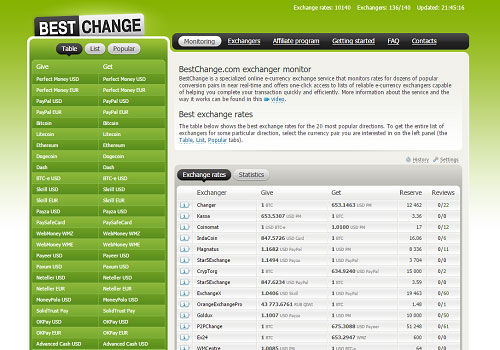
The logic is easiest to show with “USDT → hryvnia on a card”. The principle is the same for BTC and other directions.
- In the monitor, choose a direction. On the left — “Tether USDT” (in the right network), on the right — “Monobank / Privat UAH” or “Cash”.
- Compare the rows. The top one isn't always best: check the reserve (enough for your amount) and the reviews.
- Go to the exchanger and create a request. Enter the amount, your card details and get the address and network for the transfer.
- In Binance, withdraw USDT to that address. Paste the address, pick the same network the exchanger specified, and check the network fee amount.
- Wait for network confirmations — the exchanger credits hryvnia to the card after the required number of confirmations.
Compare the exchange rate across hundreds of assets in a couple of clicks before you send funds.
USDT networks: TRC-20, BEP-20, ERC-20 — don't mix them up
This is the most important section on the page. USDT exists on different blockchain networks, and they are incompatible with each other for an ordinary transfer.
| Network | Network fee | When to use |
|---|---|---|
| TRC-20 (Tron) | Low | The standard for withdrawing USDT in the CIS, if the exchanger accepts it |
| BEP-20 (BNB Chain) | Low | If you work inside the BNB ecosystem / the recipient expects BEP-20 |
| ERC-20 (Ethereum) | High | Only if the recipient accepts ERC-20 specifically |
The sending network in Binance MUST match the network the exchanger specified. Send TRC-20 to an ERC-20 address (or vice versa) and the money goes into an incompatible network, and recovering it is almost impossible. First verify the network, then the amount, and only then hit “Send”.
Fees and limits: where money really leaks
The final amount “on the card” is made up of several deductions, and not all of them are obvious:
- Network fee (for the USDT transfer). On TRC-20 it's small; on ERC-20 it can “eat” a noticeable chunk.
- Exchanger margin. Built into the rate. It's exactly what you compare in the monitor.
- Binance withdrawal fee. A fixed charge for sending coins off the exchange — depends on the network.
- Possible bank fee for crediting or conversion if the card currency differs.
Auditor's rule: don't count the “rate”, count the final amount you'll receive. An exchanger with a slightly worse rate but no hidden charges is often better than a “pretty” top rate with caveats.
Separately about Binance limits. Your verification level affects daily withdrawal limits: a basic account without full KYC is more restricted. If you plan to withdraw regularly, it makes sense to complete verification in advance so you don't hit a limit at the worst moment. Exchangers also set a minimum and maximum request amount — a large operation may have to be split into several.
Network confirmations: why the exchange isn't instant
Many are scared by the pause between “I sent USDT” and “hryvnia arrived”. That's normal: the exchanger waits until the transaction gets the required number of confirmations in the blockchain. A confirmation is the inclusion of your transfer in a new block; the more blocks on top, the more irreversible the operation and the calmer the exchanger is about crediting fiat.
On fast networks (TRC-20) confirmations arrive in seconds to minutes; on a congested Ethereum network (ERC-20) with a high fee — longer. If an operation “hangs”, it's almost always a matter of network load or an insufficient fee, not “the exchanger scammed me”. You can check the status in a block explorer using the transaction hash Binance gives you after sending.
A 10–30 minute delay when the network is busy is normal. Save the transaction hash (TXID), check the status in a blockchain explorer, and only then contact the exchanger's support. Cancelling or “speeding up” an already-sent transaction from outside is impossible.
Risks, freezes and KYC
Honestly about the downsides advertising doesn't mention:
- Bank AML monitoring. Large or frequent incoming funds may trigger a source-of-funds request. It's a lawful procedure, not “a crypto ban”.
- Verification on Binance. Without KYC, limits and features are cut; for a full withdrawal a passport is almost certainly needed.
- Exchanger reputation. Even in the monitor there are services with weak reviews. Don't chase a rate that's 0.3% better if the rating is dubious.
- Phishing. Go to the exchanger only via the monitor link and check the domain — fake “mirrors” exist.
Do your first deal with a new exchanger for a small amount. Once you're sure everything arrived correctly, work with larger sums. And enable 2FA on Binance: it's your basic lock.
Common beginner mistakes
We've collected the most expensive mistakes that repeat again and again. Check yourself against each:
- Mixed-up network. #1 for losses. Sending USDT on a network the recipient doesn't accept. Always verify the network on both sides.
- Chasing the top row. The best rate at a service with no reviews and a tiny reserve is a trap, not luck.
- Ignoring the reserve. A request larger than the reserve hangs in waiting. Check the reserve in advance.
- Sending “by eye”. Copy the address only via the clipboard and check the first/last characters — malware can swap the address in the clipboard.
- No 2FA. A Binance account without two-factor authentication is an open door.
- Storing everything on the exchange. An exchange is not a safe. Move large sums to your own wallet for the long term.
There's malware that quietly replaces a copied crypto address with the attacker's address. Never type the address by hand and don't trust the clipboard blindly — after pasting, verify at least the first 4 and last 4 characters against the original.
Checklist before withdrawing from Binance
Mentally print it out and run through the points before every large operation:
- Is 2FA enabled on your Binance account?
- Have you picked an exchanger with a good rating and sufficient reserve?
- Does the sending network match the one the exchanger specified?
- Have you checked the first and last characters of the recipient address?
- Have you calculated the final amount including all fees?
- Have you saved the TXID after sending?
- Are you ready to explain the source of funds to the bank for a large credit?
After the exchange: cold storage for large sums
If you don't cash everything out to fiat but leave some crypto “to hold”, the question of storage arises. And here a principle applies that's worth learning once and for all: “not your keys — not your coins”. While an asset sits on an exchange, the exchange technically controls it. That's acceptable for active trading, but risky for long-term storage of a large sum.
The logical ladder of security looks like this:
- Exchange (Binance) — only working funds you actively operate with.
- Non-custodial wallet (MetaMask, Trust Wallet) — you hold the keys, but the device is connected to the internet (a hot wallet).
- Hardware wallet (Ledger, Trezor) — keys stored offline, “cold”; the best option for large sums over a long term.
When moving to your own wallet you receive a seed phrase of 12–24 words. It's the only key to your money. No “support” that restores access exists. Write the phrase on paper (not in the cloud, not a screenshot), store it offline in two places, and show it to no one.
Withdrawing from Binance via the monitor is just one step. The next logical step for those whose sums are growing is to move long-term savings into cold storage, where neither an exchange, nor an exchanger, nor a scammer can reach them.
Verdict: when to choose what
Choose an exchanger via the monitor if you value speed and simplicity, don't want to deal with a counterparty, and are willing to pay a small margin for convenience and predictability.
Consider Binance P2P if you're hunting for the maximum rate, have a verified account, and understand the risk of receiving a transfer from a stranger.
Either way, a rate monitor is your comparison tool. It doesn't make the choice for you, but it stops you from overpaying blindly. And if it's a large sum for the long term — the next logical step after withdrawal is a hardware wallet for cold storage.
Binance stores crypto → the monitor shows the best exchange rate → the exchanger credits fiat. Always verify the network, count the final amount and start small.
Frequently asked questions
Can I withdraw money from Binance straight to a Monobank card?
USDT to a wallet or to a monitor-listed exchanger, which then credits hryvnia to the card. Verify current terms on the official sites.Which network should I choose when withdrawing USDT from Binance?
TRC-20 (Tron) is cheaper and faster. But the network must match the one your exchanger or wallet accepts. If the recipient expects TRC-20 and you send BEP-20, the funds may be lost.